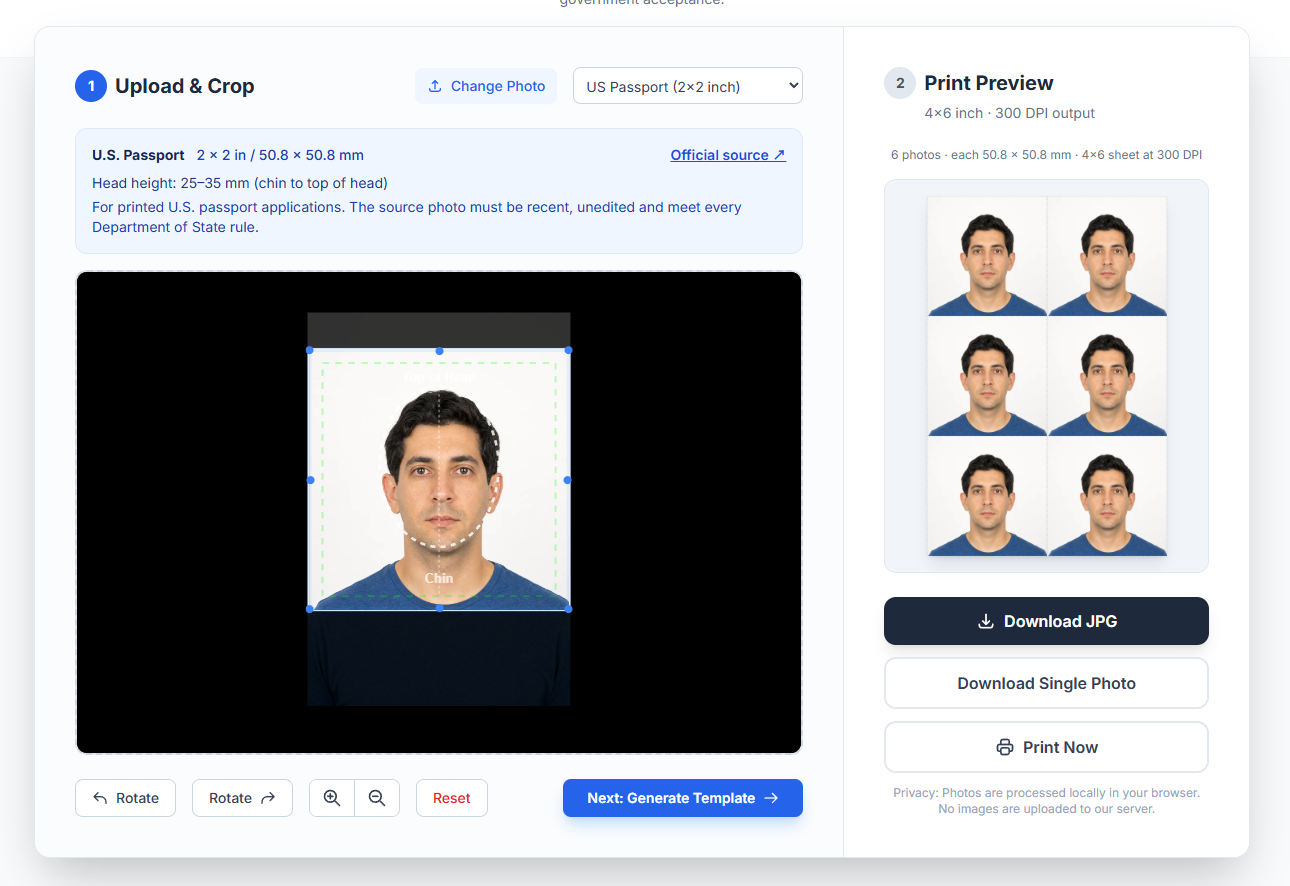
1 Upload & Crop
Click to Upload Photo
or drag and drop here (JPG, PNG, WebP · max 20 MB)
AI-generated person for software demonstration only
2 Print Preview
4×6 inch · 300 DPI output
The number of copies is calculated from the selected size.
Privacy: Photos are processed locally in your browser. No images are uploaded to our server.
How to use this Passport Photo Print Template
Upload your photo
Start with a recent, unedited photo that follows the receiving authority’s rules. Upload it or use our clearly labelled synthetic demo. The file stays in your browser memory.
Crop and Adjust
Select the application type, read its warning and open the official source. Move and zoom the image using the guide as a visual aid; the guide is not an automated compliance test.
Download and Print
Download either one correctly sized image or a 4×6 sheet. Print at Actual Size / 100% only where home or retail printing is accepted. Canada and Australia have stricter capture and print rules.
Passport Photo Size Requirements
| Country / Type | Dimensions (Inch) | Dimensions (mm) | Background |
|---|---|---|---|
| United States Passport | 2 x 2 inch | 51 x 51 mm | White / Off-white |
| US Visa | 2 x 2 inch | 51 x 51 mm | White |
| United Kingdom (UK) | 1.38 x 1.77 inch | 35 x 45 mm | Light Grey |
| Schengen Visa (common) | 1.38 x 1.77 inch | 35 x 45 mm | Light Grey |
| Canada Passport | 1.97 × 2.76 inch | 50 × 70 mm | Commercial photographer required |
| Australia Passport | Official size range applies | 35–40 × 45–50 mm | Professional capture/print recommended |
💡 Pro Tips for Printing at Home
- Check whether self-printing is allowed: Requirements differ by authority. Canada requires professional capture and printing; UK paper-photo rules also specify paper quality.
- Check Scale: Ensure your printer settings are set to "100% Scale" or "Do Not Scale". Do not use "Fit to Page".
- Measure a test print: Before printing your photo, print the sheet once and confirm the physical width with a ruler. Printer drivers can silently scale images.
What this tool checks—and what it cannot check
It does
- Lock the selected width-to-height ratio
- Export the requested print dimensions at 300 DPI
- Calculate how many copies fit on 4×6 paper
- Process your image locally
It does not
- Confirm identity or photo age
- Measure biometric landmarks automatically
- Detect every shadow, filter or expression issue
- Guarantee acceptance by any authority
How we maintain the specifications
Each preset links to the government or intergovernmental source used for the dimensions. We record the review date, separate printed-photo rules from digital-upload rules, and add a warning where an authority requires a professional photographer or discourages online tools. See our editorial and corrections policy.
Specifications reviewed: June 28, 2026. Always recheck the linked authority before applying.
Tested workflow, shown honestly
This screenshot was captured from the working browser tool on June 28, 2026. It uses the clearly labelled AI-generated demonstration person, not a real applicant. The preview shows the corrected 2×3 U.S. 4×6 layout.